Close Menu
  • Home
  • Latest News
  • Tech News
  • Blog
  • Contact

Subscribe to Updates

Get the latest creative news from FooBar about art, design and business.

What's Hot

Apple September 9, 2025 Event: iPhone 17, Apple Watch Ultra 3, AirPods Pro 3 & More

August 28, 2025

India says goodbye to GPS, to have its own desi navigation system, IRNSS

August 22, 2025

Ad Blockers Could be Banned in Germany

August 22, 2025
Facebook X (Twitter) Instagram
Today Bridge
  • Home
  • Latest News
  • Tech News
  • Blog
  • Contact
Facebook X (Twitter) Instagram
Today Bridge
Home » Where to Find Telegram Downloaded Files on Android, iPhone, and PC
Tech News

Where to Find Telegram Downloaded Files on Android, iPhone, and PC

Todays BridgeBy Todays BridgeJanuary 21, 2025No Comments3 Mins Read
Share Facebook Twitter Pinterest LinkedIn Tumblr Reddit Telegram Email
Find Telegram Downloaded Files
Share
Facebook Twitter LinkedIn Pinterest Email

Telegram is a popular messaging app used worldwide for its versatility and secure communication. Many users download files, including images, videos, and documents, but later struggle to find them on their devices. Whether you’re using Android, iPhone, or PC, this guide will help you locate Telegram downloaded files with ease.


Table of Contents

Toggle
  • 1. Where to Find Telegram Downloaded Files on Android
    • Steps to Locate Telegram Files on Android:
  • 2. Where to Find Telegram Files on iPhone
    • Steps to Access Telegram Files on iPhone:
  • 3. Where to Find Telegram Files on PC
    • Steps to Locate Telegram Files on Windows or macOS:
  • Tips for Managing Telegram Downloads:
  • Conclusion

1. Where to Find Telegram Downloaded Files on Android

Telegram saves downloaded files in your device storage, but the exact location may vary depending on your settings.

Steps to Locate Telegram Files on Android:

  1. Default File Manager:
    • Open the File Manager app on your phone.
    • Navigate to the Internal Storage or Phone Storage.
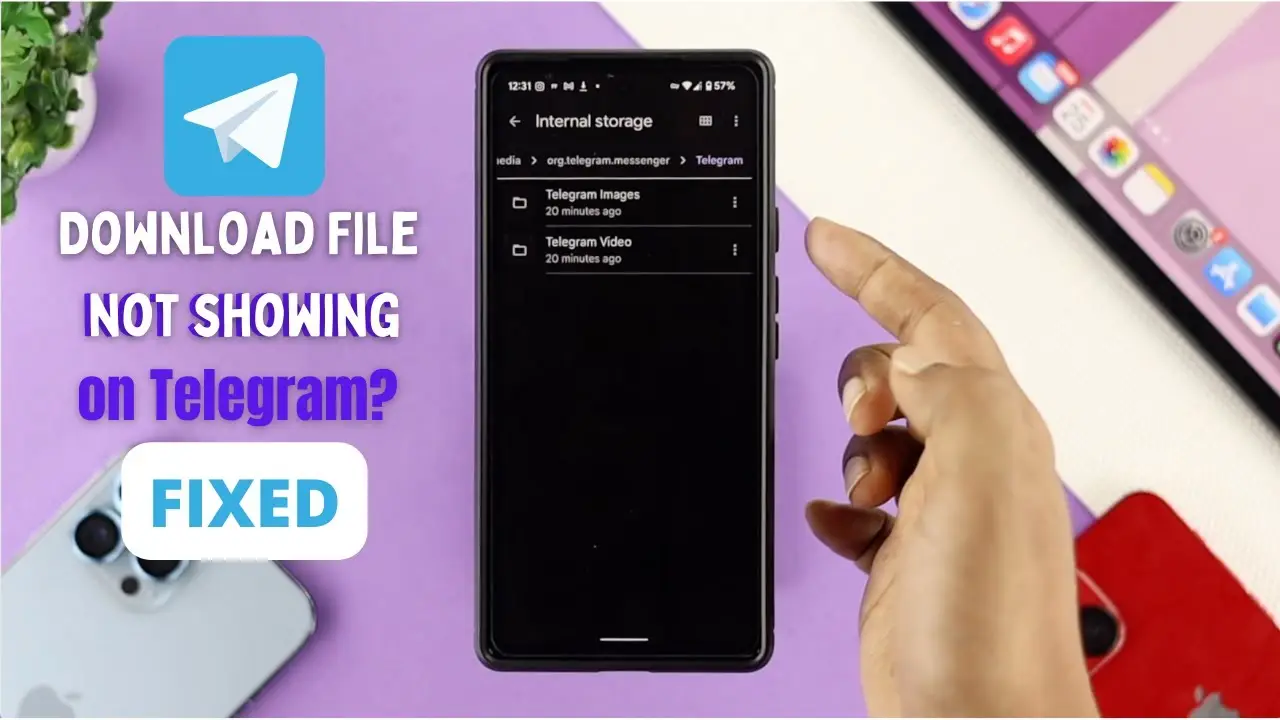
    • Locate the folder named Telegram.
    • Inside the folder, you’ll see subfolders like:
      • Telegram Images: For downloaded photos.
      • Telegram Video: For videos.
      • Telegram Documents: For PDFs, Word files, etc.
  2. Gallery or Media Apps:
    • Open your phone’s gallery or a media app.
    • Look for a folder named Telegram or check the downloads section.
  3. Change Default Download Location: If you’ve set a custom download path:
    • Go to Telegram Settings > Data and Storage > Storage Path.
    • Check the current folder path for your downloads.

2. Where to Find Telegram Files on iPhone

On iPhones, Telegram files are stored differently due to iOS restrictions.

Steps to Access Telegram Files on iPhone:

  1. Telegram App:
    • Open the Telegram app.
    • Go to the chat where the file was shared.
    • Tap the file to view it. For images or videos, they’re accessible directly within the chat or gallery.
  2. Files App:
    • If you’ve saved a file to your iPhone, open the Files app.
    • Check the Downloads folder or On My iPhone > Telegram if a custom path was set.
  3. Third-Party Apps:
    • Use a third-party file manager like Documents by Readdle to organize or transfer files from Telegram.

3. Where to Find Telegram Files on PC

On desktops or laptops, Telegram downloads are saved in a designated folder.

Steps to Locate Telegram Files on Windows or macOS:

  1. Default Download Folder:
    • Open the File Explorer (Windows) or Finder (Mac).
    • Navigate to the Downloads folder or check for a Telegram Desktop folder.
  2. Telegram App:
    • Open Telegram on your PC.
    • Right-click the downloaded file in the chat and select Show in Folder.
  3. Custom Download Location:
    • Check the download settings in Telegram Desktop:
      • Go to Settings > Advanced > Download Path to see where files are saved.

Tips for Managing Telegram Downloads:

  • Organize Files: Regularly clean up the Telegram folder to free up storage.
  • Enable Auto-Download Settings: Set preferences for which files to download automatically.
  • Cloud Storage: Save important files to Google Drive, iCloud, or other cloud services for easy access.

Conclusion

Locating Telegram downloaded files is straightforward if you know where to look. On Android, files are stored in the Telegram folder within your device storage. On iPhones, they are accessible through the Telegram app or Files app. On PC, the Downloads folder or a custom path will store your files.

Share. Facebook Twitter Pinterest LinkedIn Tumblr Email
Previous ArticleExpressVPN Launches 7-Day Free Trial Offer to Celebrate U.S. Presidential Inauguration
Next Article How to Save Someone’s WhatsApp Profile Picture in 2025
Todays Bridge
  • Website

A dedicated Fantasy Cricket Analyst with a deep passion for the game, focused on delivering insightful stats and well-researched predictions to empower others in making smart Fantasy Cricket decisions.

Related Posts

Latest News

Apple September 9, 2025 Event: iPhone 17, Apple Watch Ultra 3, AirPods Pro 3 & More

August 28, 2025
Tech News

India says goodbye to GPS, to have its own desi navigation system, IRNSS

August 22, 2025
Tech News

Ad Blockers Could be Banned in Germany

August 22, 2025
Add A Comment
Leave A Reply Cancel Reply

ad

Apple September 9, 2025 Event: iPhone 17, Apple Watch Ultra 3, AirPods Pro 3 & More

August 28, 2025

India says goodbye to GPS, to have its own desi navigation system, IRNSS

August 22, 2025

Ad Blockers Could be Banned in Germany

August 22, 2025

India Squad for Asia Cup 2025

August 22, 2025
Most Popular

Top 10 Most Popular Torrent Sites 2025

January 7, 202585 Views

Toss Prediction for Today’s International Matches – February 13, 2025

December 28, 202466 Views

Apple Agrees to $95 Million Settlement in Siri Privacy Lawsuit

January 7, 202522 Views
Our Picks

Apple September 9, 2025 Event: iPhone 17, Apple Watch Ultra 3, AirPods Pro 3 & More

August 28, 2025

India says goodbye to GPS, to have its own desi navigation system, IRNSS

August 22, 2025

Ad Blockers Could be Banned in Germany

August 22, 2025

Subscribe to Updates

Get the latest creative news from FooBar about art, design and business.

Facebook X (Twitter) Instagram Pinterest
  • DMCA Policy
  • Terms and Conditions
  • Privacy Policy
  • Get In Touch
© Copyright 2026 Today Bridge . Designed by Web Design & Development.

Type above and press Enter to search. Press Esc to cancel.